Keyboard Shortcuts
The bottom bar always shows the keys that work in the current context. Press ? for the full list.
Global
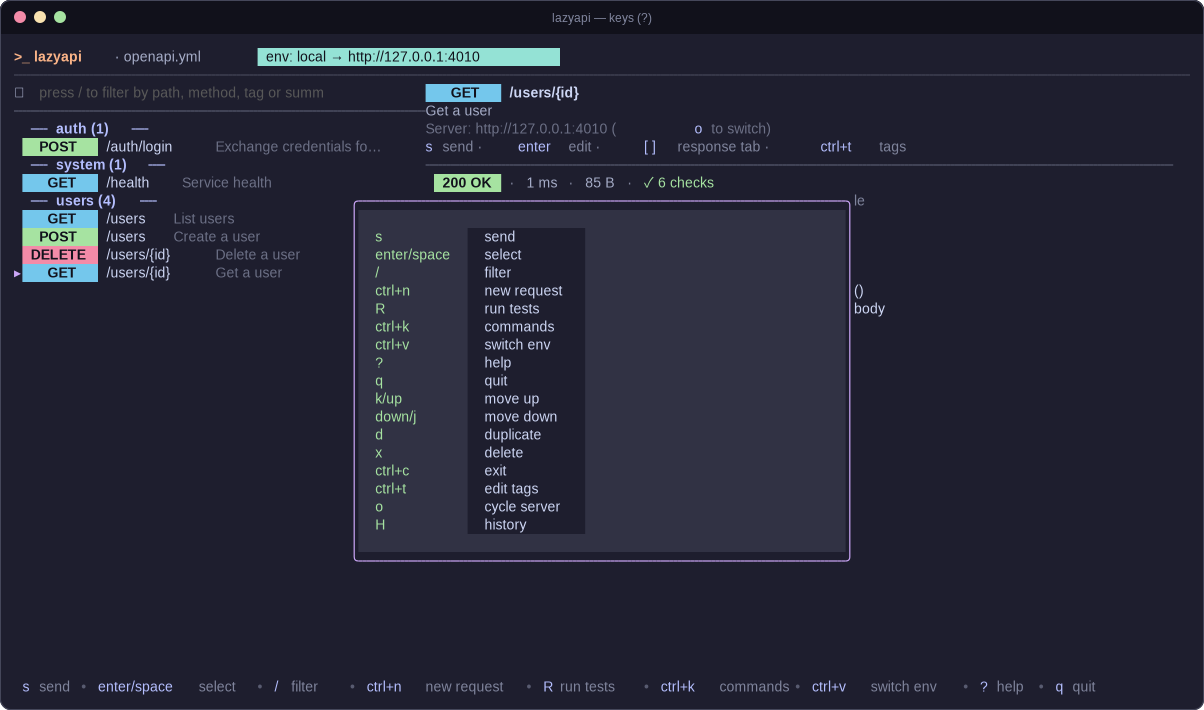
| Key | Action |
|---|---|
ctrl+k | Command palette: open an operation, run the spec / a tag / flows, switch environment, history, copy as cURL |
? | Toggle help (ignored while typing in a field) |
ctrl+v | Switch environment: the named environments of .lazyapi/config.yml (or .env* files when there is no config), then "none" |
esc | Cancel the request in flight (while the spinner is shown) |
ctrl+c | Quit |
Request List
| Key | Action |
|---|---|
↑/k, ↓/j | Move |
enter | Open in the editor |
s | Send the selected request. POST/PUT/PATCH/DELETE ask for confirmation |
[ / ] | Previous / next response tab (Body, Headers, Cookies, Timeline, Checks, Console) |
pgup / pgdown | Scroll the response |
o | Cycle the server |
/ | Filter by method, path, summary or tag (esc clears) |
ctrl+n | New draft request |
d | Duplicate |
x | Delete |
ctrl+t | Edit tags |
R | Run the spec's read-only operations in the runner |
H | Open the history |
q | Quit |
Request Editor
| Key | Action |
|---|---|
tab / shift+tab | Next / previous field: method → server → URI → Send → tabs → response |
alt+enter | Send from any field |
enter (on Send) | Send |
F5 | Run the test script on the last response (sends first if there is none) |
ctrl+o | Save to the spec (definitions, test script) |
ctrl+e | Save the last response as an example in the spec (outside text fields and editors, where ctrl+e is "end of line") |
ctrl+x | Open the Body or Tests tab in $VISUAL / $EDITOR |
alt+c | Copy the request as cURL (with the active environment's server and credentials) |
{{ or $name | Open the variable menu; ↑/↓ choose, tab inserts, esc closes |
alt+f | Format the JSON body |
ctrl+z / ctrl+y | Undo / redo in Body, Tests and the description |
shift + movement, alt+a | Select in the code editor (esc clears) |
ctrl+c / alt+x / alt+v | Copy (only with a selection; otherwise quit) / cut / paste |
esc | Leave tab content, then back to the list |
Tabs
| Key | Tab | Action |
|---|---|---|
← / → | (tab bar) | Switch tab |
enter | (tab bar) | Edit the tab content |
ctrl+q | Params | Add query parameter |
ctrl+p | Params | Add path parameter |
ctrl+g | Headers | Add header |
ctrl+g | Body (form) | Add form field |
ctrl+r | Auth | Add auth scheme |
del / ⌫ | Auth | Delete the selected auth scheme |
Response panel (when focused)
| Key | Action |
|---|---|
[ / ] or 1–6 | Body / Headers / Cookies / Timeline / Checks / Console |
r | Toggle raw / pretty body |
f | jq filter for the body (empty enter removes it) |
/ | Search the response; n / N jump between matches |
ctrl+y | Copy the response body |
↑ ↓ pgup pgdown, mouse wheel | Scroll |
Runner
| Key | Action |
|---|---|
↑/k, ↓/j, g / G | Move through the results |
enter | On a flow: expand / collapse its steps. Otherwise: focus the details |
tab | Focus the result details (response tabs, search, jq); tab/esc back to the list |
F | Show only failures |
e | Open the operation in the editor |
R | Run again |
esc | Stop the run in progress, then back |
History
| Key | Action |
|---|---|
↑/k, ↓/j | Move |
enter | Replay: open the request in the editor with the values it was sent with |
d | Diff the response with the previous response of the same operation |
x | Diff the response with the example saved in the spec |
X | Delete the history shown (asks y/N) |
tab | Focus the response details |
esc | Close the diff, then back |