Request Editor
Open a request from the list to enter the editor. It shows the request details across six tabs.
Layout
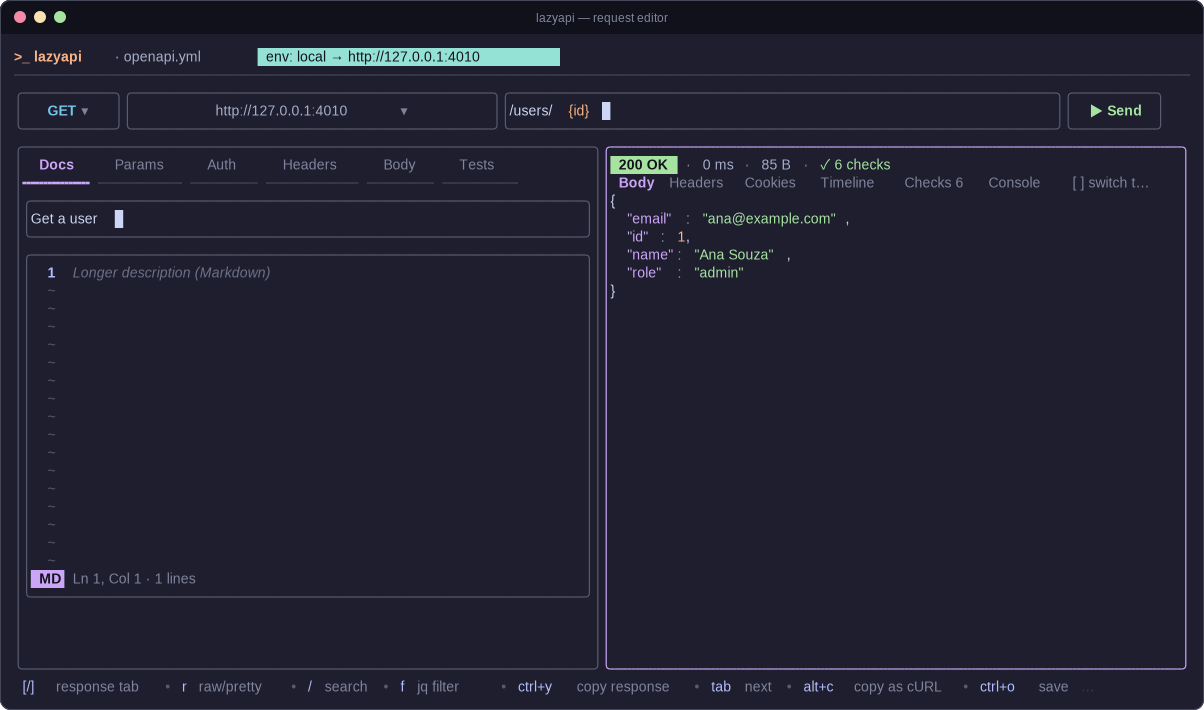
Top controls
- Method — select from GET, POST, PUT, PATCH, DELETE, OPTIONS, HEAD
- Server URL — picked from the spec's
serverslist - URI — the endpoint path, with
{{env.X}}support - Send — press
Enteron the Send button, oralt+enterfrom any field. The response, status/contract checks and test results appear on the right (Response View)
Opening an operation pre-fills path parameters, required query/header parameters and the request body from the spec's examples. Bodies can be edited in $EDITOR with ctrl+x.
When the spec declares a request body schema but no example, the editor builds one from the schema (examples, defaults, enums, formats and minimums of each property) so you start from a valid shape. lazyapi run never invents bodies: this only fills the editor.
Mouse and selects
Everything can be clicked: the method and server selects, the URI (places the cursor), Send, the tab labels, fields inside a tab (focuses them), the code editors (click places the cursor, drag selects, shift+click extends) and the response. The mouse wheel scrolls the tab under the pointer, an open list, or the response. In the request list, a click selects and a double click opens.
Selects show ▾. enter/space or a click opens the list; ↑/↓, home/end, pgup/pgdown, the wheel or typing the first letters (p → POST, p again → PATCH) move; enter, tab or a click picks; esc or a click outside cancels. Closed, ↑/↓ change the value directly.
Switching rows on and off
Every header, query parameter, path parameter and form field has a checkbox (☑ on, ☐ off), and every auth scheme an on/off switch on its first line. ctrl+t on the focused row (or a click on the box) toggles it. A row that is off keeps its name and value but is not sent; auth schemes that are off are not applied.
The state is saved with the request's draft in .lazyapi/.local/drafts/ (under disabled:, and disabled: true on auth schemes), so it survives restarts and is used by s in the list. Saving to the spec (ctrl+o) keeps the parameter and scheme definitions of rows that are off; lazyapi run reads the spec and is not affected.
Templates
{{env.NAME}} and {{var.NAME}} work in every field and editor, and are colored as you type: teal when the active environment has a value, red underlined when it does not.
- Type
{{or the shortcut$($TOK) to open the completion menu: the env file's variables and the environment's vars, with values masked when they look like credentials.↑/↓choose,tab(orenter) inserts{{env.TOKEN}},esccloses the menu. - References without a value are also listed in the bottom bar (
⚠ no value: {{env.TOKEN}}), because they would be sent as empty strings. Vars set by scripts at run time (vars.set,before()) are not known before sending. - A password field shows its value when it is only references (
{{env.PASSWORD}}holds no secret). - The URL field also colors the host,
{path}parameters and query keys.
Tabs
Documentation
A free-form Summary (single line) and Description (multi-line) for the operation. These are persisted back to the OpenAPI spec on save.
Params
Two sub-sections:
- Query parameters — key/value pairs sent as URL query string. Add with
n+q. - Path parameters — key/value pairs that replace
{param}placeholders in the URI. Add withn+p.
Auth
Authentication schemes of the request. ctrl+r adds one, ⌫/del on its Scheme select removes it. Scheme reuses a scheme the spec already defines (so several requests share one definition) or creates a new one. Supports:
- Basic — Username + Password
- Bearer — Token
- API Key — Key name + In (header/query/cookie) + Value
- OAuth2 — Grant, Client ID/secret, Authorization/Token URL, Scopes
- OpenID Connect — Issuer URL (endpoints discovered from
.well-known/openid-configuration), Grant, Client ID/secret, Scopes
OAuth schemes have a Login button (ctrl+l) and show the stored session. Sending without a session logs in first. See Authentication.
Header
Custom HTTP headers as key/value pairs. Add with n + h. Common headers like Content-Type are set automatically from the body type.
Body
The request body, in the operation's media type:
- JSON, text, XML, … — the code editor (below): JSON is colored, validated as you type (templates count as values) and formatted with
alt+f.ctrl+xopens it in$EDITOR. application/x-www-form-urlencodedandmultipart/form-data— Form fields: one name/value row per field, like the Headers tab.tab/shift+tabmove between cells,ctrl+gadds a field, a row without a name is dropped, and a repeated name sends the field several times. The rows are kept as a JSON object, which is encoded as form fields when sending;ctrl+xedits that object in$EDITOR. File parts are only sent from the CLI (--file).
Select the type from the dropdown.
Tests
The code editor, in JavaScript, for the operation's test script (see Test Scripts). Scripts can use request, response, env, vars, lazyapi.send(), test() and expect(), and may import relative files or https:// modules.
Press F5 to run the script against the last response. Results, failure messages and console output appear below the editor. When you save (ctrl+o), the script is written to .lazyapi/tests/<operationId>.js next to the spec and linked through x-lazyapi-tests.
test("status is 200", () => expect(response).toHaveStatus(200));
test("matches the OpenAPI schema", () => expect(response).toMatchSchema());
test("has an id", () => expect(response.json()).toHaveProperty("id"));
Code editor
Body, Tests and the Docs description use the same editor:
- syntax colors (Catppuccin), line numbers with the current line highlighted, and a status line with the language,
Ln, Coland, for JSON,✓ validor the parse error. The line with the error gets a red●; {,[,(and quotes close themselves; typing the closer steps over it;backspacebetween a pair removes both;enterkeeps the indentation and opens an indented line between brackets;tab/shift+tabindent and dedent (two spaces);alt+fformats JSON (key order kept);ctrl+z/ctrl+yundo and redo; pasting keeps line breaks;- selection:
shift+ any movement (arrows,home/end,alt+←/→,pgup/pgdown) selects,alt+aselects everything,escclears it. Typing replaces the selection, and an opening bracket or quote wraps it;tab/shift+tabindent or dedent the selected lines;backspacedeletes it; - clipboard:
ctrl+ccopies the selection (with nothing selected it quits, as everywhere),alt+xcuts,alt+vpastes from the system clipboard (terminal paste works too); homegoes to the indentation, then column 0;ctrl+home/ctrl+end;alt+←/alt+→move by word;ctrl+wdeletes the word before the cursor;ctrl+udeletes to the line start;- in Tests, syntax errors as you type (JavaScript and TypeScript, checked with esbuild: the line gets a red
●, the message goes to the status line) and the signature of the call the cursor is in (ƒ lazyapi.send(target, options?),toHaveProperty(path, value?), …); - dynamic values:
{{$(or$name) offers the built-in faker variables and the helpers the Tests script exports, with a description; unknown names are drawn as missing and listed in the help bar; - in Tests, completions for the script API as you type:
response.(status,json(), …),expect(…).(every matcher),lazyapi.,env.,vars.and the globals. Methods insert()with the cursor inside.
esc closes an open menu first, then leaves the editor.
Field navigation
Tab/Shift+Tabcycles through: Method → Server → URI → Send → Tabs → ResponseEnterinside a tab activates tab content (Blocker mode)Escblurs tab content; a secondEscexits the tab back to field cycling- Within tab content (e.g., Params rows), Tab/Shift+Tab wraps cyclically
Saving
ctrl+o— saves changes back to the spec (Summary, Description, param definitions, body content type, auth schemes, test script)Ctrl+E— saves the last response as an example in the spec- Runtime values (body content, header values, param values) are saved to session temp files